This chapter extracts data from GeoTessera, a cloud-optimized tiling scheme for geospatial raster archives. GeoTessera makes it possible to retrieve small regions of interest from large archives without downloading whole scenes.
The pipeline is similar to Sentinel-2: search a catalog, read the selected tiles, reproject if needed, and write GeoTIFFs.
Environment setup
The first cell installs AerEO plus the GeoTessera search and reader plugins. On Binder these are pre-installed, so pip will skip the download.
# Install AerEO and any required plugins for this notebook (Google Colab)
!pip install -q "aereo[viz]" aereo-search-tessera aereo-read-tessera
Config used in this notebook
job_tessera.yaml targets the GeoTessera catalog over Oxford, UK:
name: tessera_sample
grid_dist: 10_000
grid_cells_margin: 10
target_aoi: config/aoi/oxford.geojson
output_uri: /tmp/aereo_extraction
overwrite: false

search:
  _target_: aereo.search_tessera.search_tessera
  _partial_: true
  collections:
    geotessera: []
  intersects: ${target_aoi}
  start_datetime: "2025-01-01T00:00:00Z"
  end_datetime: "2025-12-31T00:00:00Z"
  tessera_version: v1.1
  tessera_variant: cambridge

read:
  _target_: aereo.read_tessera.read_tessera
  _partial_: true
  bands: [1,2,3]

reproject:
  _target_: aereo.builtins.reproject_odc
  _partial_: true
reproject_mode: grid
resolution: 10

write:
  _target_: aereo.builtins.write.write_geotiff
Key points:
search_tesseraqueries the GeoTessera catalog.tessera_versionandtessera_variantselect the tile scheme version.bands: [1,2,3]reads the first three bands.resolution: 10produces a 10 m regular grid.
# Download config files and AOIs from the GitHub repository so this
# notebook can run outside the repo (e.g. Google Colab).
import os
import urllib.request

GITHUB_RAW = "https://raw.githubusercontent.com/frandorr/aereo/main"

os.makedirs("config/aoi", exist_ok=True)

# Config files
urllib.request.urlretrieve(
    f"{GITHUB_RAW}/examples/config/job_tessera.yaml",
    "config/job_tessera.yaml",
)

# AOI files
urllib.request.urlretrieve(
    f"{GITHUB_RAW}/examples/config/aoi/oxford.geojson",
    "config/aoi/oxford.geojson",
)
Loading the job
ExtractionJob.load_from_config() parses the YAML with Hydra, resolves every _target_ callable, and validates the resulting ExtractionJob. The config_name argument is the YAML filename without extension, and config_dir is the folder that contains it.
A job is a declarative bundle of pipeline steps. Once loaded, the same job can be searched, can have tasks built from it, and can be executed.
from aereo.cache import TaskResultCache
from aereo.executors import LocalExecutor
from aereo.pipeline import ExtractionJob

job = ExtractionJob.load_from_config(
    config_dir="config",
    config_name="job_tessera",
)
Search and task building
job.search() calls the configured search provider and returns a GeoDataFrame of matched assets. This is a separate step from execution: it only discovers what data is available, without reading or writing anything.
job.build_tasks(assets) turns those assets into a list of ExtractionTask objects. Each task groups the assets needed for one grid cell and time slice, so the work can be parallelised later.
assets = job.search()2026-07-08 14:09:50 [info ] search_called provider=search_tessera
tasks = job.build_tasks(assets)2026-07-08 14:09:50 [info ] build_tasks_start assets=2 builder=build_grouped_tasks
Running the extraction
job.execute(tasks, executor=...) runs each task through the per-task pipeline: read GeoTessera tiles → reproject to 10 m → write GeoTIFF.
artifacts = job.execute(
    tasks,
    executor=LocalExecutor(workers=-1, use_threads=True, cache=TaskResultCache()),
)
print(f"✓ Extracted {len(artifacts)} artifacts")
2026-07-08 14:09:50 [info ] execute_start executor=LocalExecutor task_count=1
✓ Extracted 4 artifacts
Visualizing results
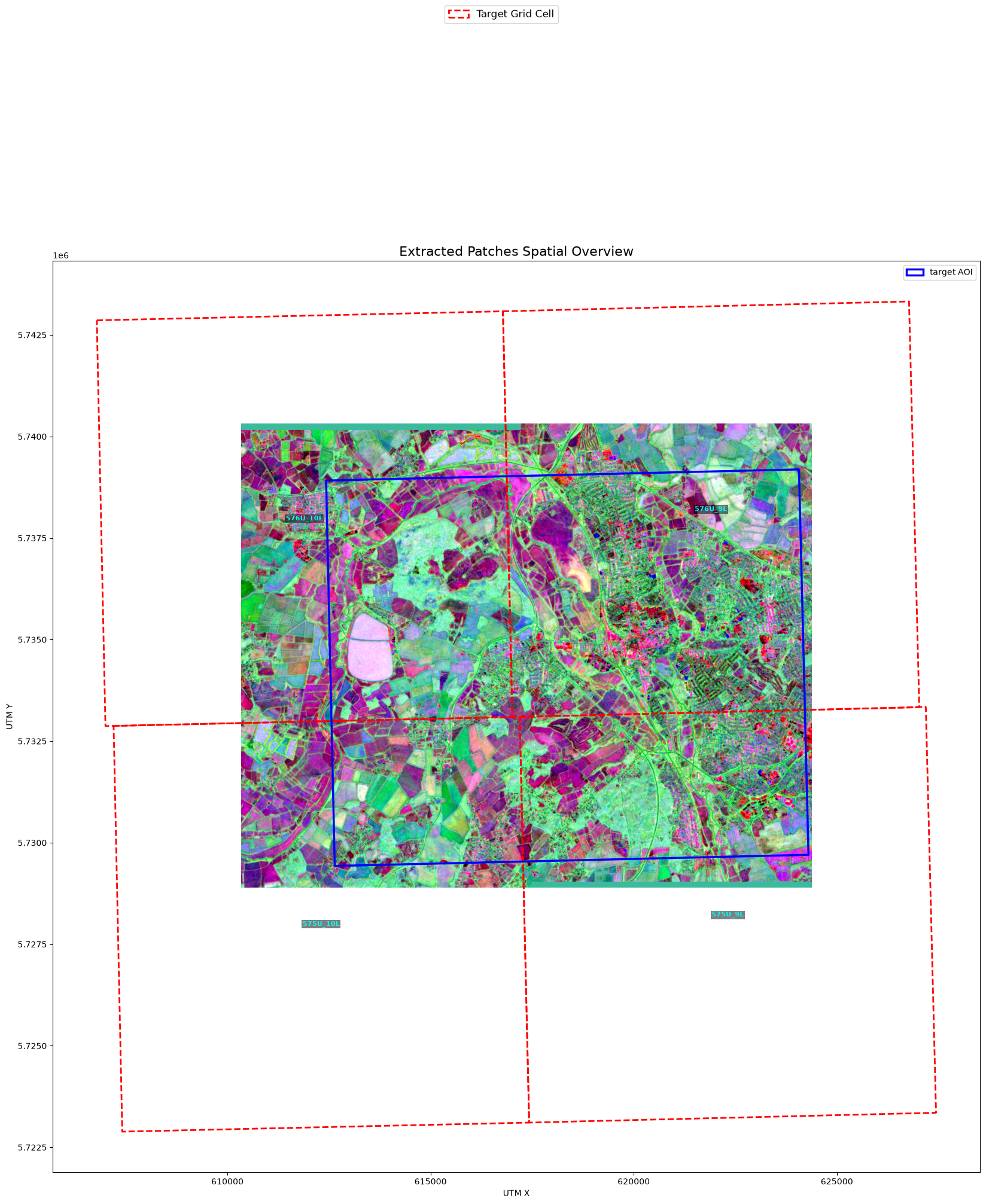
plot_artifact_patches renders the three-band output over the Oxford AOI.
from aereo.viz import plot_artifact_patches

fig, ax = plot_artifact_patches(
    artifacts, bands=[1, 2, 3], ds_factor=1, stretch="percentile", aoi=job.target_aoi
)
Ignoring fixed x limits to fulfill fixed data aspect with adjustable data limits.