This chapter walks through a complete AerEO extraction pipeline for Sentinel-2 L2A imagery.
AerEO is built around the ExtractionJob. A job declaratively combines a search provider, a reader, optional preprocess/reproject/postprocess steps, a writer, and a grid definition that splits the area of interest (AOI) into independent tasks. By keeping all of this in a YAML config, the same job can be reproduced from a notebook, the command line, or an AWS Lambda handler.
Environment setup
The first cell installs AerEO and any required plugins. If you are reading the rendered book or running on Binder, where the environment is already prepared, pip will report that the requirements are satisfied and skip the download.
# Install AerEO and any required plugins for this notebook (Google Colab)
!pip install -q "aereo[viz]" # if using planetarey-computer version: aereo[viz,pc]
Config files used in this chapter
The next cell downloads two files:
job_sentinel2.yaml— the AerEO job configuration.chocon.geojson— the AOI over Argentina’s Chocón region.
Keeping configuration outside the notebook makes the pipeline reusable and version-controllable. Here is the full YAML we are loading:
# Common vars reused in the config
target_bands: [red, nir]
aoi_path: config/aoi/chocon.geojson

name: sentinel2_sample
grid_dist: 10_000
grid_cells_margin: 10
target_aoi: ${aoi_path}
output_uri: /tmp/aereo_extraction
overwrite: false

search:
  _target_: aereo.builtins.search_stac
  _partial_: true
  stac_api_url: "https://earth-search.aws.element84.com/v1"
  collections:
    sentinel-2-l2a: ${target_bands}
  intersects: ${aoi_path}
  start_datetime: "2024-01-01T00:00:00Z"
  end_datetime: "2024-01-10T23:59:59Z"

read:
  _partial_: true
  _target_: aereo.builtins.read_odc_stac
write:
  _target_: aereo.builtins.write.write_geotiff
Key fields:
target_aoi— path to the AOI GeoJSON.grid_dist— spacing of the MajorTOM grid used to split the AOI into cells (10 km here).search.collections— STAC collection and bands to retrieve.readandwrite— plugin callables that load assets and save GeoTIFFs.
# Download config files and AOIs from the GitHub repository so this
# notebook can run outside the repo (e.g. Google Colab).
import os
import urllib.request

GITHUB_RAW = "https://raw.githubusercontent.com/frandorr/aereo/main"

os.makedirs("config/aoi", exist_ok=True)

# Config files
urllib.request.urlretrieve(
    f"{GITHUB_RAW}/examples/config/job_sentinel2.yaml",  # use job_sentinel2-pc.yaml for planetary-computer version
    "config/job_sentinel2.yaml",
)

# AOI files
urllib.request.urlretrieve(
    f"{GITHUB_RAW}/examples/config/aoi/chocon.geojson",
    "config/aoi/chocon.geojson",
)
Loading the job
ExtractionJob.load_from_config() parses the YAML with Hydra, resolves every _target_ callable, and validates the resulting ExtractionJob. The config_name argument is the YAML filename without extension, and config_dir is the folder that contains it.
A job is a declarative bundle of pipeline steps. Once loaded, the same job can be searched, can have tasks built from it, and can be executed.
from aereo.cache import TaskResultCache
from aereo.executors import LocalExecutor
from aereo.pipeline import ExtractionJob

# Load the job from the Hydra config package.
job = ExtractionJob.load_from_config(
    config_dir="config",
    config_name="job_sentinel2",
)
Search and task building
job.search() calls the configured search provider and returns a GeoDataFrame of matched assets. This is a separate step from execution: it only discovers what data is available, without reading or writing anything.
job.build_tasks(assets) turns those assets into a list of ExtractionTask objects. Each task groups the assets needed for one grid cell and time slice, so the work can be parallelised later.
assets = job.search()  # Use the search method from the job object to get the assets.
tasks = job.build_tasks(assets)
len(tasks)
2026-07-08 14:47:05 [info ] search_called provider=search_stac
2026-07-08 14:47:07 [info ] build_tasks_start assets=16 builder=build_grouped_tasks
8The executor
AerEO separates what to run (the tasks) from how to run them. LocalExecutor runs tasks on the local machine. The workers argument controls parallelism, and use_threads=True uses a threading backend, which is a good default for I/O-bound COG readers.
# now we create an Executor, in this case a LocalExecutor to run
# each ExtractionTask using Threads
local_exec = LocalExecutor(workers=-1, use_threads=True, cache=TaskResultCache())
Running the extraction
job.execute(tasks, executor=...) hands the prepared tasks to the executor. The executor runs each task independently; inside every task AerEO performs the pipeline:
read -> preprocess -> reproject -> postprocess -> writeThe returned object is a GeoDataFrame of artifacts — one row per output GeoTIFF with its metadata, CRS, and footprint.
# Extract!
print("Extracting...")
artifacts = job.execute(tasks, executor=local_exec)
print(f"✓ Extracted {len(artifacts)} artifacts")
Extracting...
2026-07-08 14:47:07 [info ] execute_start executor=LocalExecutor task_count=8
✓ Extracted 56 artifacts
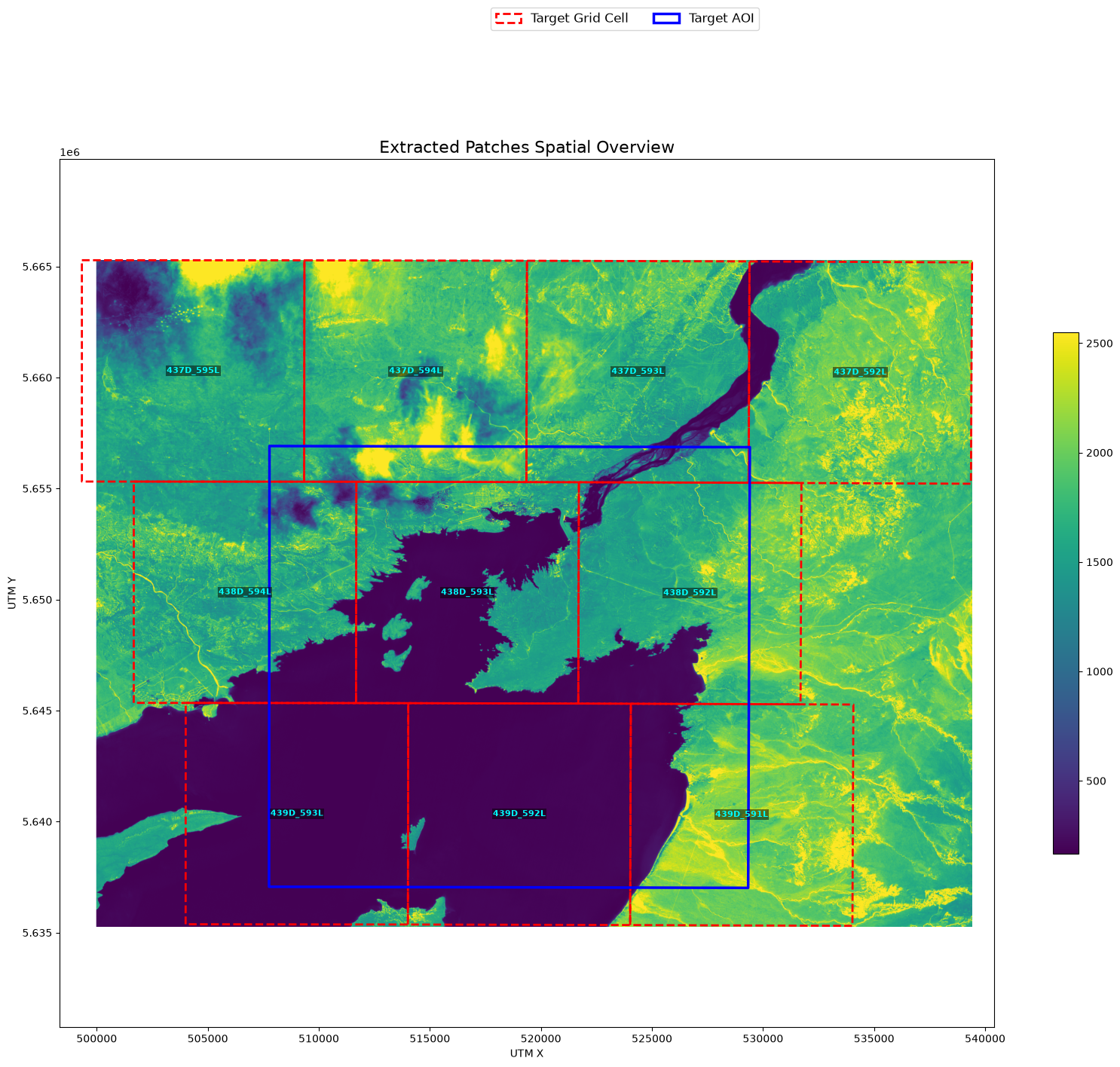
Visualizing results
plot_artifact_patches renders the extracted patches over the AOI. The stretch="percentile" option improves contrast by clipping to a percentile range.
from aereo.viz import plot_artifact_patches

plot_artifact_patches(
    artifacts,
    ds_factor=1,
    cmap="viridis",
    stretch="percentile",
    aoi=job.target_aoi,
    aoi_edgecolor="blue",
)
(<Figure size 2000x1495.93 with 2 Axes>,
<Axes: title={'center': 'Extracted Patches Spatial Overview'}, xlabel='UTM X', ylabel='UTM Y'>)Ignoring fixed y limits to fulfill fixed data aspect with adjustable data limits.