AerEO plugins are plain Python functions — no base classes, no inheritance, no framework API to learn. You register them under the aereo.plugins entry-point group and AerEO discovers them automatically.
In this chapter we build to_db, a tiny processor that converts Sentinel-1 linear backscatter to decibels, package it as a real installable plugin, and run it in an extraction job — reusing the Sentinel-1 setup from the previous chapter.
Environment setup
The first cell installs AerEO and any required plugins. If you are reading the rendered book or running on Binder, where the environment is already prepared, pip will report that the requirements are satisfied and skip the download.
# Install AerEO and any required plugins for this notebook (Google Colab)
!pip install -q "aereo[viz,pc]"
Installing the demo plugin
The demo plugin ships inside the aereo repository at examples/plugins/aereo_demo_plugin. The next cell installs it straight from GitHub (inside a repo checkout, pip install -e examples/plugins/aereo_demo_plugin does the same).
# Install the demo plugin package that ships in the aereo repo.
# (When running inside the repo: pip install -e examples/plugins/aereo_demo_plugin)
!pip install -q "git+https://github.com/frandorr/aereo.git#subdirectory=examples/plugins/aereo_demo_plugin"
The plugin: one function, one entry point
This is the entire processor:
"""Demo processor plugin: convert SAR backscatter to decibels."""

import numpy as np
import xarray as xr
from pydantic import ConfigDict, validate_call


@validate_call(config=ConfigDict(arbitrary_types_allowed=True))
def to_db(ds: xr.Dataset, clip_min: float = 1e-6) -> xr.Dataset:
    """Convert linear backscatter (e.g. Sentinel-1 vv/vh) to decibels.

    Values at or below ``clip_min`` are clipped before the log to avoid
    ``-inf`` in the output.
    """
    return 10.0 * np.log10(ds.clip(min=clip_min))
And its registration in the package’s pyproject.toml. The process_ prefix tells AerEO this is a processor stage (search_, read_, reproject_, write_, task_builder_ work the same way):
[project.entry-points."aereo.plugins"]
process_to_db = "aereo_demo_plugin.processors:to_db"
The contract is just the signature: a processor takes an xr.Dataset and returns one. It can be used as preprocess (before reprojection) or postprocess (after). The arbitrary_types_allowed config is needed because xr.Dataset is not a Pydantic-native type.
Discovery: the plugin is now in the registry
Once the package is installed, AerEO finds it via entry points — no imports, no wiring. AereoRegistry can also introspect the plugin’s parameters, which is how config files get validated:
from aereo.registry import AereoRegistry

registry = AereoRegistry()
print("process_to_db registered:", "process_to_db" in registry.list_all_params())
print("parameters:", registry.get_plugin_params("process_to_db"))
2026-07-27 11:07:43 [info ] Discovering aereo plugins...
2026-07-27 11:07:44 [debug ] Loaded processor: process_composite
2026-07-27 11:07:44 [debug ] Loaded processor: process_ndvi
2026-07-27 11:07:44 [debug ] Loaded processor: process_ndwi
2026-07-27 11:07:44 [debug ] Loaded processor: process_normalize
2026-07-27 11:07:44 [debug ] Loaded processor: process_qa_mask
2026-07-27 11:07:44 [debug ] Loaded processor: process_select_bands
2026-07-27 11:07:44 [debug ] Loaded reader: read_odc_stac
2026-07-27 11:07:44 [debug ] Loaded reprojector: reproject_odc
2026-07-27 11:07:44 [debug ] Loaded reprojector: reproject_swath
2026-07-27 11:07:44 [debug ] Loaded searcher: search_stac
2026-07-27 11:07:44 [debug ] Loaded task_builder: task_builder_grouped
2026-07-27 11:07:44 [debug ] Loaded writer: write_geotiff
2026-07-27 11:07:44 [debug ] Loaded processor: process_composite
2026-07-27 11:07:44 [debug ] Loaded processor: process_ndvi
2026-07-27 11:07:44 [debug ] Loaded processor: process_normalize
2026-07-27 11:07:44 [debug ] Loaded processor: process_qa_mask
2026-07-27 11:07:44 [debug ] Loaded processor: process_select_bands
2026-07-27 11:07:44 [debug ] Loaded reader: read_odc_stac
2026-07-27 11:07:44 [debug ] Loaded reprojector: reproject_odc
2026-07-27 11:07:44 [debug ] Loaded searcher: search_stac
2026-07-27 11:07:44 [debug ] Loaded task_builder: task_builder_grouped
2026-07-27 11:07:44 [debug ] Loaded writer: write_geotiff
2026-07-27 11:07:44 [debug ] Loaded processor: process_to_db
2026-07-27 11:07:44 [debug ] Loaded reader: read_earthlens
2026-07-27 11:07:44 [debug ] Loaded searcher: search_earthlens
process_to_db registered: True
parameters: {'required': [], 'optional': [{'name': 'clip_min', 'default': 1e-06, 'type': "<class 'float'>", 'description': ''}]}
Config files used in this chapter
The next cell downloads job_sentinel1.yaml (the Sentinel-1 job from the previous chapter), job_sentinel1-db.yaml, and the Chocón AOI. The second config inherits the first and adds our plugin as postprocess — Hydra instantiates it by dotted path, exactly like the built-in stages:
defaults:
  - job_sentinel1
  - _self_

name: sentinel1_db
output_uri: /tmp/aereo_extraction_s1_db

# The to_db processor comes from the demo plugin package
# (examples/plugins/aereo_demo_plugin), registered via entry points.
postprocess:
  - _target_: aereo_demo_plugin.processors.to_db
    _partial_: true
# Download config files and AOIs from the GitHub repository so this
# notebook can run outside the repo (e.g. Google Colab).
import os
import urllib.request
GITHUB_RAW = "https://raw.githubusercontent.com/frandorr/aereo/main"
os.makedirs("config/aoi", exist_ok=True)
# Config files (job_sentinel1-db.yaml inherits from job_sentinel1.yaml)
for name in ["job_sentinel1.yaml", "job_sentinel1-db.yaml"]:
urllib.request.urlretrieve(
f"{GITHUB_RAW}/examples/config/{name}",
f"config/{name}",
)
# AOI files
urllib.request.urlretrieve(
f"{GITHUB_RAW}/examples/config/aoi/chocon.geojson",
"config/aoi/chocon.geojson",
)Loading the job
ExtractionJob.load_from_config() parses the YAML with Hydra, resolves every _target_ callable — including aereo_demo_plugin.processors.to_db — and validates the resulting ExtractionJob.
from aereo.cache import TaskResultCache
from aereo.executors import LocalExecutor
from aereo.pipeline import ExtractionJob

# Load the job from the Hydra config package.
job = ExtractionJob.load_from_config(
    config_dir="config",
    config_name="job_sentinel1-db",
)
Search and task building
job.search() calls the configured search provider and returns a GeoDataFrame of matched assets. This is a separate step from execution: it only discovers what data is available, without reading or writing anything.
job.build_tasks(assets) turns those assets into a list of ExtractionTask objects. Each task groups the assets needed for one grid cell and time slice.
assets = job.search()  # Use the search method from the job object to get the assets.
tasks = job.build_tasks(assets)
len(tasks)
2026-07-27 11:07:44 [info ] search_called provider=search_stac
2026-07-27 11:07:47 [info ] build_tasks_start assets=4 builder=build_grouped_tasks
/home/fran/repos/aereo/.venv/lib/python3.13/site-packages/pydantic/_internal/_validate_call.py:137: UserWarning: assets has no 'crs' column; assuming all assets share the same native CRS. Mixed-CRS assets in one task may fail or produce incorrect results.
  res = self.__pydantic_validator__.validate_python(pydantic_core.ArgsKwargs(args, kwargs))
2The executor
AerEO separates what to run (the tasks) from how to run them. LocalExecutor runs tasks on the local machine. The workers argument controls parallelism, and use_threads=True uses a threading backend, which is a good default for I/O-bound COG readers.
# now we create an Executor, in this case a LocalExecutor to run
# each ExtractionTask using Threads
local_exec = LocalExecutor(workers=-1, use_threads=True, cache=TaskResultCache())
Running the extraction
Each task runs read -> reproject -> postprocess -> write, where postprocess is now our to_db plugin: the GeoTIFFs come out in decibels, converted after reprojection to the Major TOM grid.
# Extract! Each task runs read -> reproject -> postprocess (our to_db) -> write.
print("Extracting...")
artifacts = job.execute(tasks, executor=local_exec)
print(f"✓ Extracted {len(artifacts)} artifacts")
Extracting...
2026-07-27 11:07:47 [info ] execute_start executor=LocalExecutor task_count=2
✓ Extracted 20 artifacts
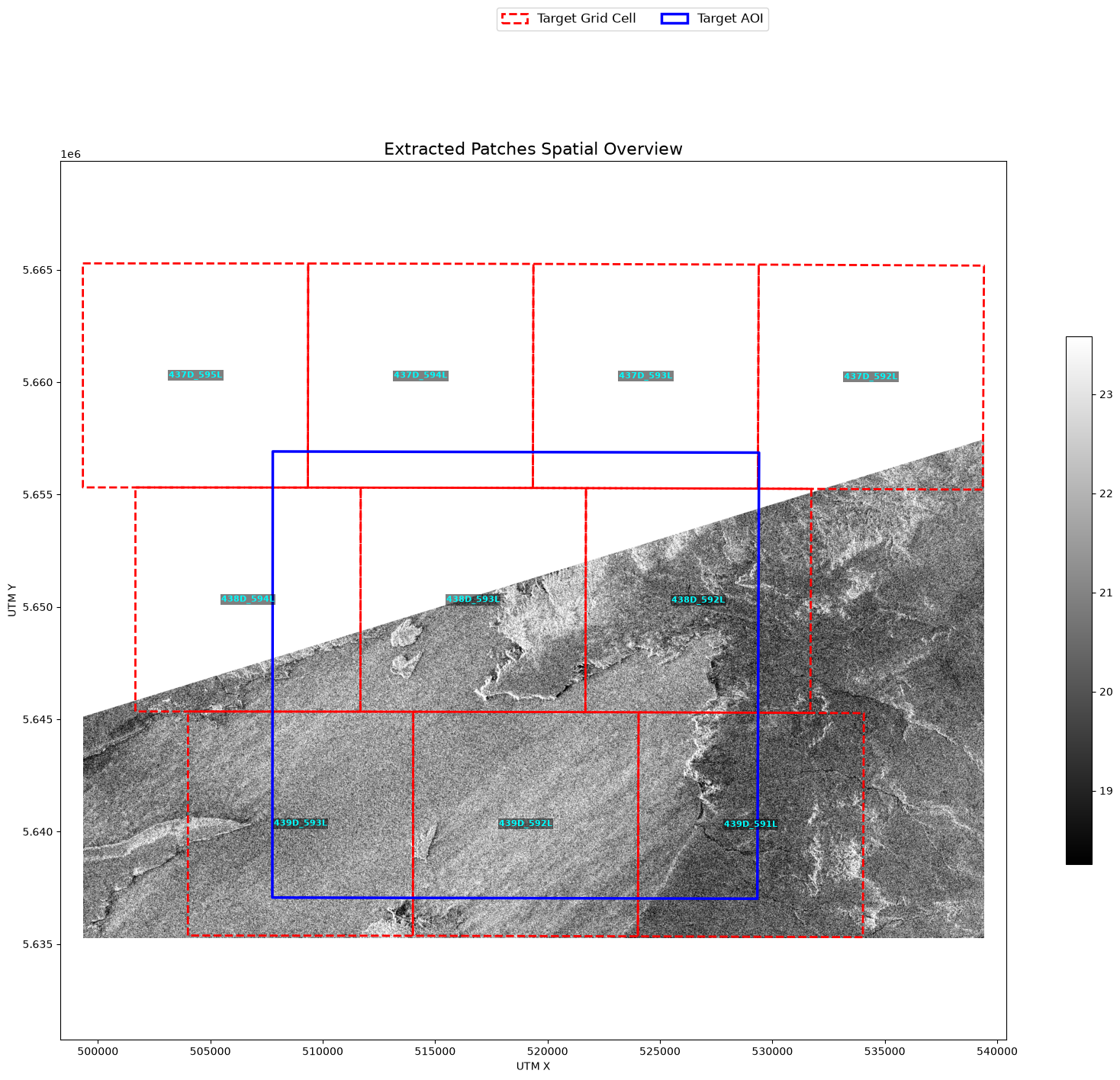
Visualizing results
Same scene as the Sentinel-1 chapter, but note the colorbar: values are now in dB. The plugin ran inside the pipeline — no notebook-side postprocessing involved.
from aereo.viz import plot_artifact_patches

plot_artifact_patches(
    artifacts,
    ds_factor=1,
    cmap="gray",
    stretch="percentile",
    aoi=job.target_aoi,
    aoi_edgecolor="blue",
)
(<Figure size 2000x1495.93 with 2 Axes>,
<Axes: title={'center': 'Extracted Patches Spatial Overview'}, xlabel='UTM X', ylabel='UTM Y'>)Ignoring fixed y limits to fulfill fixed data aspect with adjustable data limits.
Alternative: skip packaging, pass the function directly
Entry points make a plugin discoverable and shareable. But for quick experiments you don’t even need a package — any function can be passed straight to the job:
from aereo.pipeline import ExtractionJob
from aereo_demo_plugin.processors import to_db

job = ExtractionJob(
    name="s1_db_inline",
    grid_dist=10_000,
    output_uri="/tmp/aereo_s1_db_inline",
    search=search_stac,
    read=read_odc_stac,
    postprocess=[to_db],   # <- just a function
    write=write_geotiff,
    target_aoi=aoi,
)
Package it when you want to share it; keep it inline while you iterate. See Build a Plugin for the full stage-by-stage reference.