Grids
AerEO uses the Major TOM grid (paper) to turn any AOI into a set of equal-area, globally consistent cells. Outputs are indexed by cell ID, so scenes from different sensors line up without manual reprojection.
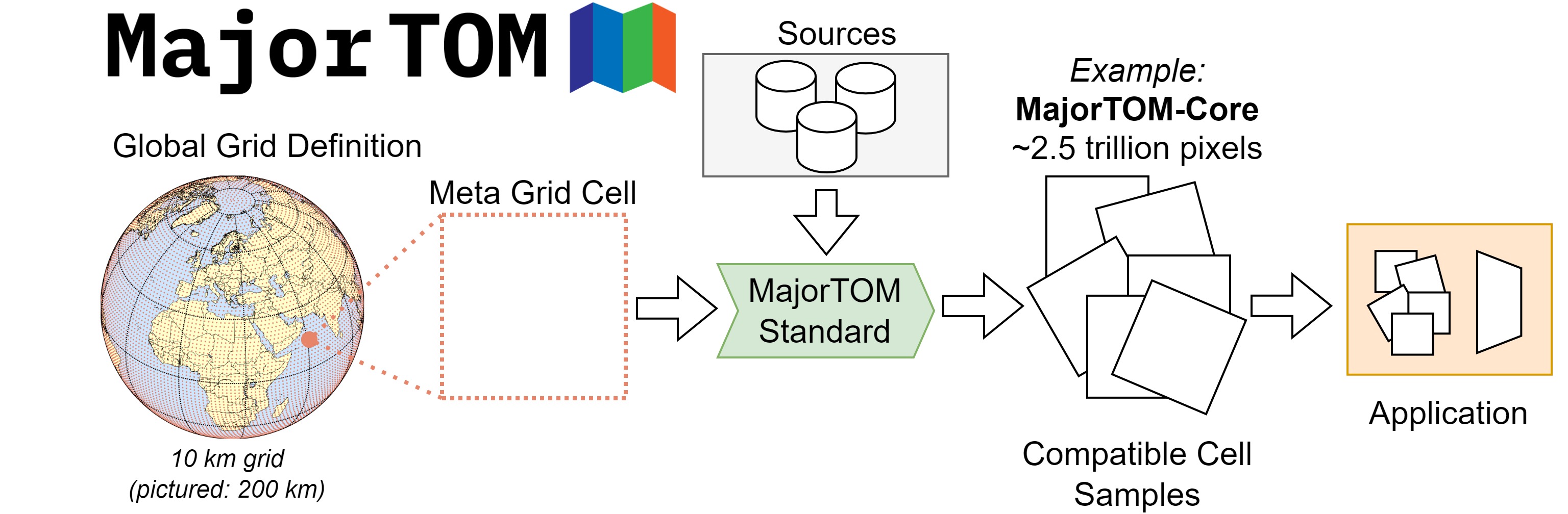 The Major TOM equal-area grid. Image from the ESA Phi Lab repository.
Major TOM grid basics
The grid divides the world into fixed cells. When you set grid_dist, AerEO selects the cells that intersect your AOI and uses them as the extraction framework.
from aereo.pipeline import ExtractionJob

job = ExtractionJob(
    name="demo",
    grid_dist=10_000,  # 10 km cells
    output_uri="/tmp/demo",
    target_aoi=aoi,
    read=read_odc_stac,
    write=write_geotiff,
)
Grid cell size
grid_dist | Use case |
|---|---|
1_000 | Very high resolution, small-area ML patches. |
10_000 | Common default for Sentinel-2 regional extractions. |
50_000 | Large-area composites and quick overviews. |
Smaller cells mean more tasks and smaller files; larger cells mean fewer tasks and larger files.
How cells become tasks
flowchart LR
    AOI["AOI polygon"] --> Grid["Major TOM grid"]
    Grid --> Cells["Intersecting cells"]
    Cells --> Group["Group by time + native CRS"]
    Group --> Tasks["ExtractionTask list"]
build_grouped_tasks intersects the AOI with the grid, then groups the resulting cells by acquisition time and native CRS. Each group becomes one or more ExtractionTask objects, depending on cells_per_task.
Reprojecting to a cell's local UTM geobox
When reproject_mode is "grid", AerEO reprojects each cell to its local UTM zone before writing. This keeps pixels square and avoids warping a whole scene to a single CRS when it spans multiple UTM zones.
See Reprojection for details.
Grid helpers
from aereo.grid import build_grid_cells, intersect_cells

cells = build_grid_cells(aoi, grid_dist=10_000)
selected = intersect_cells(cells, aoi)
These helpers are useful when you want to inspect the grid before running an extraction. The Configuration section explains how grid_dist and target_aoi are declared in YAML.